Guides
CLAP vs VST3: which plugin format should producers use?
On this page13 sections
- What are CLAP and VST3?
- CLAP vs VST3 at a glance
- Does CLAP sound better than VST3?
- Is CLAP always faster or lower CPU?
- Which DAWs support CLAP?
- How to install a CLAP plugin on Windows
- Should I install both CLAP and VST3?
- Which format should you choose?
- Choose CLAP when:
- Choose VST3 when:
- Keep the current format when:
- A five-minute compatibility test
- The practical verdict
CLAP and VST3 do not have an inherent sound-quality difference. They are two ways for a DAW and a plugin to exchange audio, parameters, events, and state. Choose CLAP when your DAW supports it well and you want the plugin’s CLAP-specific modulation or event features. Choose VST3 when you need broader host compatibility or must exchange projects with people whose DAWs do not support CLAP.
That is the short answer. The useful answer depends on your DAW, the individual plugin, and whether the project must move between systems.

What are CLAP and VST3?
A plugin format is the contract between an audio plugin and its host. It tells both sides how to exchange audio, MIDI or note events, parameter changes, presets, state, latency information, and graphical-editor requests.
CLAP stands for CLever Audio Plug-in. It is an open audio plugin ABI with a reference implementation published under the MIT license. The format was designed around modern event handling, extensibility, parameter modulation, and cooperation between a plugin and host.
VST3 is the established format found in a much larger range of DAWs and commercial products. For many producers it remains the safest common format when sessions move between different applications or collaborators.
Neither format performs EQ, compression, synthesis, or reverb by itself. The plugin’s DSP code does that work.
For a beginner-friendly explanation before comparing formats, start with what a CLAP audio plugin is.
CLAP vs VST3 at a glance
| Question | CLAP | VST3 |
|---|---|---|
| Does it sound better? | No automatic advantage | No automatic advantage |
| Host coverage | Growing, but not universal | Broad |
| Open reference implementation | Yes, MIT licensed | Uses Steinberg’s VST3 SDK |
| Modern parameter modulation | Designed to keep modulation distinct from the base value | Depends on host and plugin implementation |
| Per-note and polyphonic features | Strong native model when implemented | Possible features vary by host and plugin |
| CPU use | Can be excellent, but must be measured per plugin and host | Can also be excellent; format alone does not decide it |
| Best reason to choose it | Modern features in a confirmed CLAP host | Compatibility and session exchange |
The important phrase is when implemented. A format can expose a capability, but a plugin and host both need to support it before you experience the benefit.
Does CLAP sound better than VST3?
No. If a developer builds both versions around the same DSP and feeds them the same sample-accurate inputs, the audio can be identical.
Differences can still appear because of:
- different plugin versions;
- different oversampling or quality settings;
- host-specific automation behavior;
- a feature available in only one build;
- gain or preset mismatches;
- implementation bugs.
Those are testable product and host differences, not proof that one format has a universally better sound.
Is CLAP always faster or lower CPU?
No. CLAP provides mechanisms intended to help hosts and plugins cooperate efficiently, but the file extension does not optimize DSP automatically.
CPU use depends on the algorithm, sample rate, buffer size, oversampling, channel count, active features, host scheduling, and the developer’s code. A useful performance claim therefore needs a named plugin, version, host or test harness, sample rate, buffer size, and repeatable workload.
Spectral Colors publishes measured performance on products such as SPC Prism Q. Those numbers describe that product and test—not every CLAP plugin.
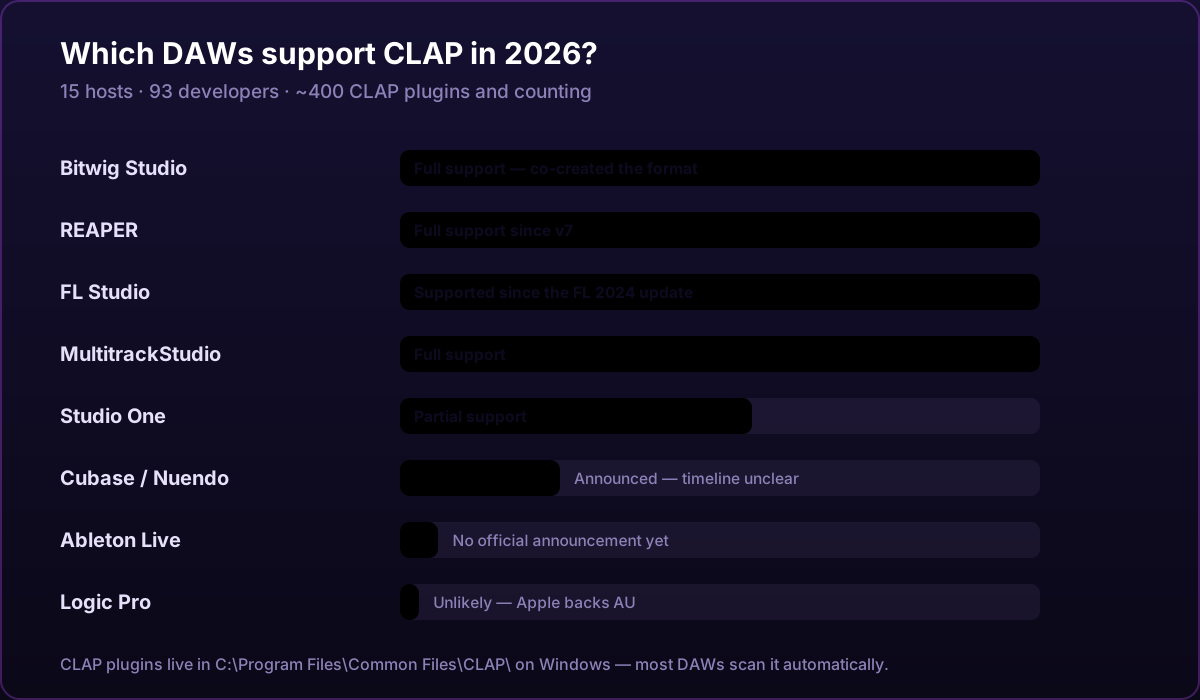
Which DAWs support CLAP?
As of this article’s latest check:
- FL Studio officially lists CLAP support on Windows and macOS.
- REAPER officially lists CLAP among its supported plugin formats.
- Bitwig Studio supports CLAP plugins and can prefer CLAP over VST when both versions of a matched plugin are installed.
Other hosts support CLAP too, and the list changes. Check the official CLAP host resources and your DAW developer’s current documentation rather than relying on an undated blog table.
If a DAW is absent from the current documentation, do not assume that copying a
.clap file into a folder will make it work. The host must implement the
format.
How to install a CLAP plugin on Windows
The standard Windows location is:
C:\Program Files\Common Files\CLAP\
The full host-by-host procedure and missing-plugin checklist are in how to install CLAP plugins on Windows.
The reliable process is:
- Download the plugin from its developer or an authorized store.
- Run its installer and keep the standard CLAP destination.
- Open your DAW’s plugin manager.
- Run a plugin scan or verified rescan.
- Load the plugin and save a small test project.
- Close and reopen that project before relying on it in important work.
Image-Line documents the same location and recommends using the developer’s installer. Spectral Colors installers place plugins in the standard location. For host links and troubleshooting, use the permanent Spectral Colors compatibility guide.
Should I install both CLAP and VST3?
Installing both is reasonable when:
- you use several DAWs with different format support;
- collaborators need VST3;
- you are testing a migration;
- the plugin exposes different features in each build.
But avoid switching format halfway through a project unless the developer and host explicitly support replacement. A DAW may treat the CLAP and VST3 builds as different plugin identities even when the interfaces look identical. State saved by one is not automatically guaranteed to load in the other.
For an important session, choose one format, save a test project, reopen it, and keep the installer for that exact plugin version.
Which format should you choose?
Choose CLAP when:
- your main DAW officially supports it;
- the developer actively tests the CLAP build;
- you want a CLAP-specific modulation, note-expression, or preset feature;
- you do not need to send the live session to an unsupported host.
Choose VST3 when:
- collaborators or other DAWs require it;
- the product’s VST3 build is more mature or better tested;
- you need the widest practical host coverage;
- an existing project already uses the VST3 version.
Keep the current format when:
- the project is stable;
- you cannot reproduce the full state after replacement;
- the only reason to switch is an unmeasured claim that one extension is “always faster” or “sounds better.”
A five-minute compatibility test
Before committing a new plugin format to a large project:
- Load the plugin on a test track.
- Change several parameters and select a preset.
- Automate one parameter.
- Save the project.
- Close the DAW completely.
- Reopen the project and confirm audio, preset, automation, and interface state.
- If the plugin reports latency, confirm that your host compensates for it.
This small test tells you more about your real setup than a format argument online.

The practical verdict
Use CLAP because your host and plugin support a feature or workflow you value—not because of a universal performance myth. Use VST3 when its broader compatibility solves a real project need. If both builds work equally well in your setup, either can be the right choice.
Spectral Colors develops its audio-plugin catalog for CLAP and lists format, operating-system, host, version, and latency details on each product page. That makes the decision inspectable instead of guesswork.
Frequently asked questions
Is CLAP replacing VST3?
There is no need to predict a single winner. Producers can use several formats, CLAP adoption is growing, and VST3 retains broad host and product support.
Does CLAP sound better than VST3?
No. A plugin format does not determine sound quality. Builds using the same signal processing and matched settings can produce identical audio.
Is CLAP always faster than VST3?
No. CLAP provides modern host and plugin cooperation mechanisms, but CPU use depends on the individual implementation, host, sample rate, buffer size and workload.
Can I rename a VST3 file to .clap?
No. CLAP and VST3 expose different interfaces. The plugin developer must build and distribute a real CLAP version.
Should I install both CLAP and VST3?
Install both when different DAWs or collaborators require them, but keep one format identity inside an existing project unless the developer and host explicitly support replacement.